Bulk Item Entry
With the Bulk Entry feature you are able to insert a massive amount of files into the Item List. For example, some professional business scanners have the ability to scan hundreds of pages within minutes. As these pages are scanned, they are sent to a specific directory on a local or network computer.
The person who initiates the scanning process does not have to wait for the scanner until each and every page has been process. Some professional business scanners usually have an Automatic Document Feeder (ADF) attached to allow the user to load multiple pages into the scanner. The scanned pages can then be access as images from the directory using any program.
To use the Bulk Entry feature, click on the bulk Entry icon from the toolbar.
Bulk Entry Icon.

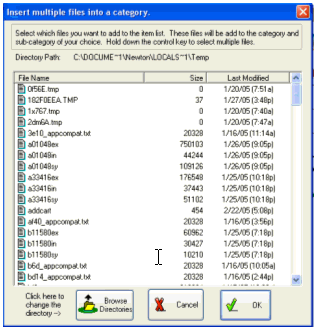
The Bulk Entry dialog box will appear (see picture below). Use the mouse to select the files that you want to incorporate into the item list then click the "OK" button at the bottom of the dialog box. The files that you have selected will move from the scanner temporary directory into the document directory that you have selected for your work.