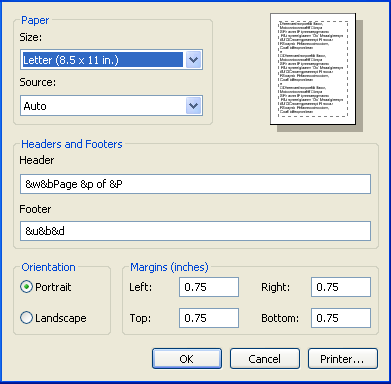
Print Page Settings
Page Setup and choosing the correct page margins.
CatalogVX contains too many printer options for this introduction manual however, there are a few things you should know before using the program to print a catalog.
1) The Home Edition of the software is limited to fix format printing. That is to say you do not have full control over the format of the pages.
2) The Professional Edition of the software gives you the ability to select your page formats using styles and combinations.
When printing it is very important to set your page margins in order to print more of your catalog within a page. This will ensure that your pages are aligned with the software and you get the best possible results.
To align your margins simply go to the Page Setup dialog and select these values for the following margin:
Bottom: 0.75"
Top: 0.75"
You can set your Left and Right Margins according to your needs. These values are for a standard 8.5' x 11' page.
See picture below.