
Print Management by Section.
To print your catalog by category and subcategory, you will need to use the Print Management by Section.
From here you can select the category/subcategory pair and the starting page number for your PDF or print pages.
This gives you the ability to arrange the printing of your catalog in any order saparated by subcategory.
Selecting Sections
1. Select your category Page Style.
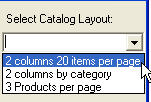
You can select different page styles for each subcategory adding additional flexibility and appearance to your catalog.
2. Select the starting page number for the section.
You will need to manual select the starting pages for your sections.
3. Select the subcategory row from the list of categories.
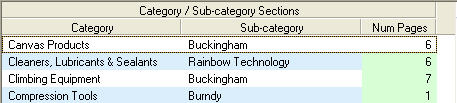
4. Click the Print Selected button to continue.
5. Select the page range to preview.
6. Click the Print Selected button to see your catalog preview.
Note: From the preview you can create a PDF file or print directly to a print.