
HTML Generation Setting
(Professional edition and above only).
The PAC Professional edition and above, has the ability to create catalog web sites directly from the data and pictures provided. PAC will generate an HTML page for each product that is viewable within the software. With this advance feature, CatalogVX can save a web master days and hours worth of work.
HTML Generation Prerequisites:
Before generating HTML, you must setup a output directory that will be used for your web HTML and data. CatalogVX will use this directory to create all the HTML pages; this directory will also be used to move all other pictures, multimedia, and documents files that are related to your catalog. You will need to create a directory on one of your hard drives that is strictly designated for this purpose.
To set the HTML output directory, perform the following steps.
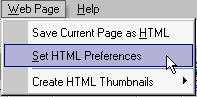
1) From the Web Page menu, select the [Set HTML Preferences] sub menu.
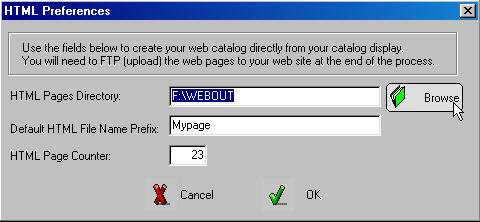
2) In the HTML Preferences dialog box, enter the location of your HTML output directory.
Note:
You may also use this dialog to enter the default HTML file prefix name and the HTML counter index. These fields are use when creating single HTML pages from the display.