
Field Prefixes
Working with time-saving Field Prefixes:
Prefixes allow you to pre-fill the catalog fields in the catalog information sheet for each individual item.
Reference numbers in many catalogs begin with the same sequence of letters. In the same catalog, you may have over a hundred reference numbers that all begins with "BYA".
For example:
BYA232
BYA2543
BYA-J972
The Field Prefix feature allows you to enter the "BYA" once for the reference number or any other reoccurring catalog field.
To access the Field Prefix feature:
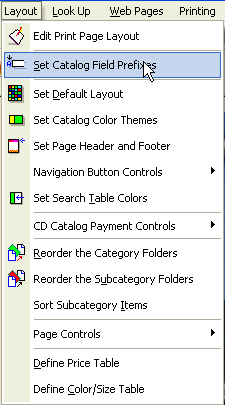
1) Select the Layout menu and the Set Catalog Field Prefixes submenu.
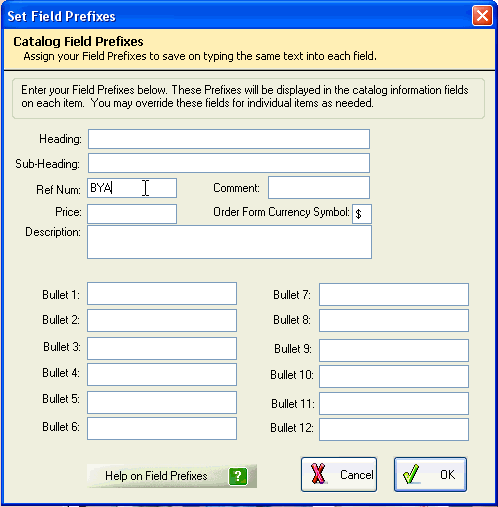
2) In the Set Field Prefix dialog box, enter the prefix in the appropriate field.
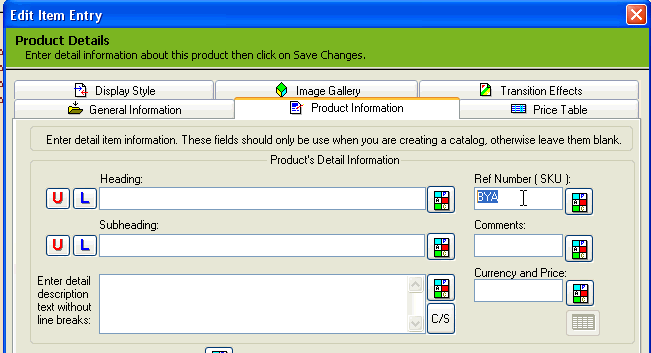
The prefix will then appear in the Catalog Information sheet for each item.
Each prefix can be overwritten at anytime when it is not being used or can be removed completely from the "Set Prefix field" dialog box.
Note: If a prefix is not entered followed by additional text, the prefix will not appear in other parts of the catalog.