
How to Purchase the CatalogVX User License.
How to register and purchase this product.
It order to use this product beyond the evaluation, you must purchase the License key on-line or at your local software distributor.
To purchase the License key on-line, you will need to get the Product Registration Key
from the Help/Register Software menu (See figure 1.0).
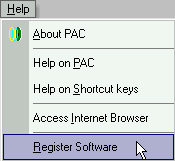
Fig 1.0
Note that each Registration key is unique and will need a matching unique License key to activate the product for continual uses. To get the matching License key you will need to purchase the product on-line at http://www.chronsystems.com/order.html
The Register Software menu automate the order process by taking you to the order site directly.
You must have an active internet connection in order to use this method.
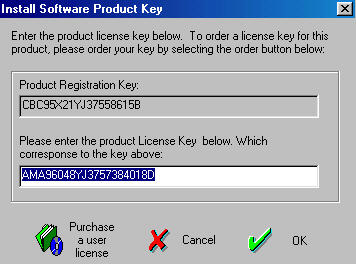
Click on the "Purchase a user license" to access the on-line order page. Follow the instructions on the order page to purchase the License key. Your License key will be E-mail to you after your payment is confirmed. To order your License key manually, go to http://www.chronsystems.com/order.html. Once your License key is sent to you by E-mail, you must cut and paste the License key number into the product License Key field. (See picture above).